
Park a sale, serve the next
A customer went back for one more thing? Park the sale and ring up the next one. The key at the top of the sale says how many are waiting, and a day does not close while one is unpaid.
The best POS in Mauritius for your
Made for Mauritius
What you get with the best POS app in Mauritius for a restaurant: the till on its tablet, the kitchen, and a back office in your browser, shown here as it is.
What you get with the best POS app in Mauritius for a shop: the till on its tablet, your stock, and a back office in your browser, shown here as it is.
An Android tablet at the counter. It takes orderssales and payments, prints, counts the drawer, and goes on with no internet.
Every feature of the tillEach ticket prints where the dish is made. On Premium a second tablet is the kitchen's screen, with a clock on every order.
Kitchen and barEvery sale takes from it. Deliveries, counts and corrections keep it true, and every tile says what is left.
StockIn any browser: your menucatalog, your figures, your staff and your set-up. The pages are below, as they are.
Look at its pagesWe open your account, set the till up with you and stay within reach, on a Mauritian number.
How you startBack office
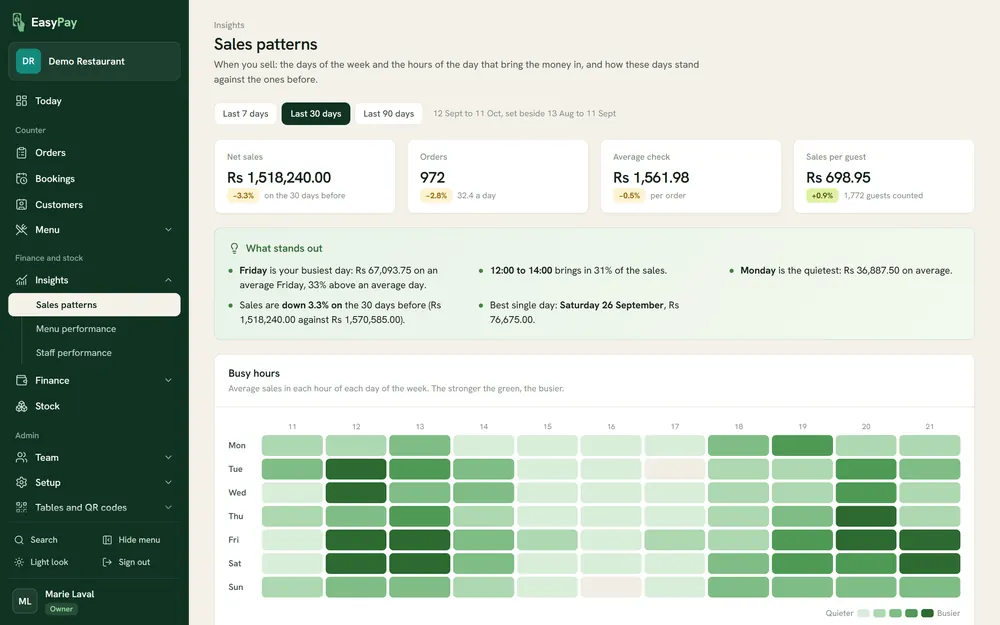
When you sell. The days and the hours that bring the money in, set beside the days before, with what stands out written in plain words.
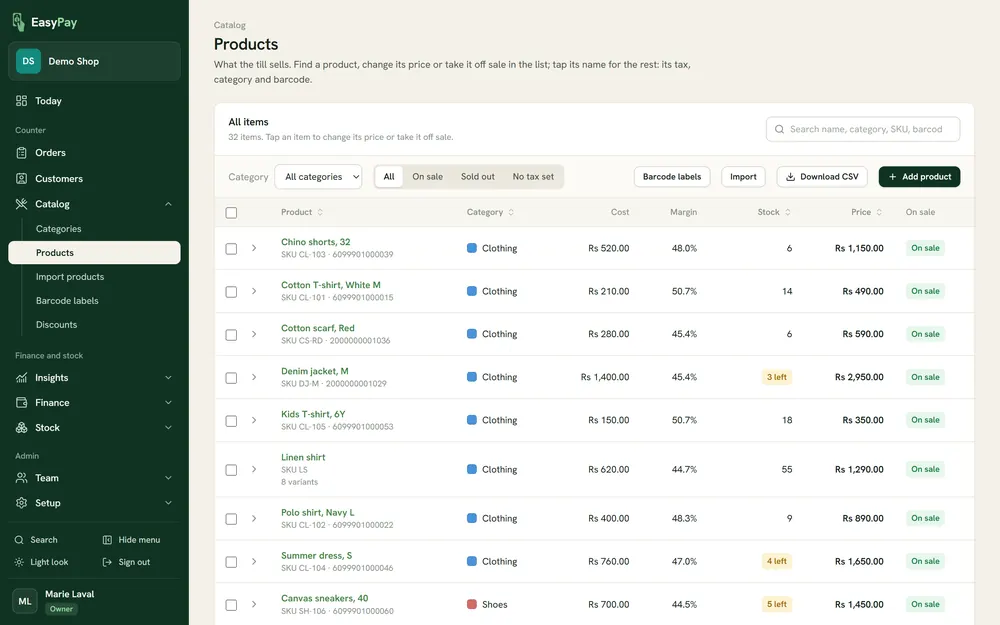
Your products with their sizes and colours, cost and margin, barcode and stock. Bring them in from a spreadsheet and print barcode labels.
Products with their sizes and colours, cost and margin, barcodes and VAT. Bring them in from a spreadsheet and print barcode labels for the shelf.
What you hold of every product, purchase orders to your suppliers, deliveries, counts and adjustments, with a movement kept for every change.
Sales, products, tax and day closing, the worth of your stock and what to reorder. Every report downloads as a spreadsheet file for your accountant.
A PIN for each member of staff, and roles that decide who may refund, discount, change a price, open the drawer or see the figures.
Categories in your colours, items, add-ons and options, discounts. VAT at 15%, zero-rated and exempt items, with prices that include or exclude tax.
Sales, items, orders, tax, day closing and time cards. Every report downloads as a spreadsheet file for your accountant.
A PIN for each member of staff, and roles that decide who may refund, discount, void, open the drawer or see the figures.
Draw the floor plans, name the kitchen and bar printers, design the receipt with your logo, and take bookings for the days ahead.
Also on the till
A customer went back for one more thing? Park the sale and ring up the next one. The key at the top of the sale says how many are waiting, and a day does not close while one is unpaid.
New, in the kitchen, ready. Every order gets a number for the day and a time it is due, and it moves along the board as the kitchen works through it.
A new version of the till is offered on the tablet itself. It downloads while you go on selling and installs when you say so.
A refund, a void after the kitchen has the order, a discount or opening the drawer can ask for a manager, who taps their name and enters their own PIN.
A refund, a discount, a changed price or opening the drawer can ask for a manager, who taps their name and enters their own PIN. It is done in the cashier's name, with who approved it kept.
Type what you counted, or count note by note from Rs 2,000 down to Rs 1. Cash in, cash out, an X report at any time, and the Z report when you close.
Type what you counted, or count note by note. Cash in and cash out print a slip for the drawer, a count is taken when the drawer changes hands, and the day closes on one.
Something should not be sold today? Switch it off on Products & stock. It cannot be rung up, by tile or by barcode, until it is switched back on.
Run out of the grilled fish? Switch it off on the till. It stays on the menu, greyed, until it is back.
Find a customer by name, phone or e-mail, or add a new one at the counter. Their name prints on the receipt, and the receipt can go to them by e-mail or WhatsApp.
The till speaks English, French and Kreol Morisien. Change it from the side menu whenever you like; the menu items stay as you typed them.
Staff clock in with their PIN and sign their own sales. The back office turns the punches into a time-card report.
Scan a product on Products & stock and give it a new price. Every till in the shop has it at its next sync, and the back office keeps what it was.
A sale takes from stock and a refund puts it back. A report shows what is left and what is running low. Barcode scanners that type like a keyboard add items straight to the order.
Around the till
Cash with the change worked out, card, and the payment types you add yourself, such as Juice or a voucher. A transfer keeps its reference, and the day's takings are listed by payment type.
Any ESC/POS receipt printer, with 58 mm or 80 mm paper, on your network or by USB cable. One more for the kitchen and one for the bar, if you want them. The cash drawer opens from the till.
An Android tablet, version 8 or later, used in landscape. On Premium, a second tablet in the kitchen becomes the kitchen screen. A barcode scanner that types like a keyboard works as it is. The back office opens in any browser.
Your BRN and VAT number print on every receipt. VAT at 15%, zero-rated and exempt items, prices that include or exclude tax, a tax report, and every report as a spreadsheet file.